Monday, 2 August 2010

Migrating a Subversion repository

In my current project, there are a number of development teams whose code repositories have grown, separately or together, in a somewhat haphazard fashion. As part of the initiative to introduce a more streamlined development process, therefore, I want to host all repositories on one server and reorganise them in a more uniform and logical way.

Using Subversion, it is relatively straightforward to move whole repositories, but taking one branch out of an existing one to add to a new repository (without losing the change history!) turns out to be surprisingly hard. After much experimentation, the best way turns out to be via Mercurial's excellent "convert" extension. Unfortunately, conversion from Hg to Subversion simply fails under Windows, so you need to use Linux.

This particular customer has a totally Windows-based infrastructure, as well as a particularly draconian firewall that uses Windows authentication exclusively. The following recipe therefore had to take that into account. Names have been blanked out where necessary to preserve client confidentiality.

  1. Install the VMWare player and a Linux appliance, such as the Ubuntu 10.04 LTS image with VMware Tools.

  2. Lightly edit the VMWare virtual machine configuration file (Ubuntu.vmx) to ensure that it has at least 1024MB of RAM. Start up the Linux VM and upgrade existing packages. This turns out to be a little more difficult than you might expect, because the Synaptic package manager (unlike Firefox) is unable to pass your Windows username and password as NTLM credentials to the network proxy server. Therefore you have to proceed as follows:

    1. Make sure that the VMWare player's network connection is set to "NAT"

    2. In System -> Preferences -> Network Proxy, set the manual HTTP proxy to the server and and port that your Windows web browser uses. If the Web browser's Internet settings nominate a proxy auto-configuration script, you may be able to use that instead. Don't forget to set your Windows username and password. Apply system-wide (you will have to supply your Linux user password twice).

    3. Open Firefox and navigate to http://sourceforge.net/projects/cntlm/ - download the .deb package and allow the package installer to install it. This is a local proxy server that logs onto the firewall on your behalf.

    4. Now configure the cntlm service as follows:
      • As superuser, edit /etc/cntlm.conf and set the following values (see the documentation):
        • Username (your Windows user ID)
        • Domain (your Windows domain)
        • Workstation (your PC name - not the full FQDN)
        • Proxy (proxy FQDN:proxy port)
        • Proxy (backup proxy FQDN:proxy port)
        • Listen 3128
      • Make sure that the permissions on cntlm.conf are -rw-r--r--
      • As a normal user, run the following command:
        cntlm -v -I -M http://test.com
      • Copy and paste the resulting profile (the lines between -------------- markers) into the cntlm.conf file - search for "#Auth" to find the insertion point
      • As the superuser, start up the cntlm service:
        /etc/init.d/cntlm start

    5. In System -> Preferences -> Network Proxy, set the manual HTTP and FTP proxy servers to localhost and port 3128. Username and password should still be your Windows credentials. Apply system-wide as before. Shutdown Firefox and open it again to check that the proxy settings are correct.

    6. Open System -> Administration -> Synaptic Package Manager (it will request your Linux user password). Go to Settings and configure a manual proxy just as in System Preferences.

    7. Still in the package manager, click Reload. You should see the package files being downloaded successfully. Click "Mark All Upgrades".

    8. Still in the package manager, type "subversion" into the search box. Mark both "subversion" and its dependencies and "python-subversion" for installation. Similarly for "mercurial". Finally, click "apply", click the Apply button, and sit back.

    9. Part way through the installation process, you may encounter a warning that the Linux system image cannot be safely installed without GRUB. However, the grub loader has been superseded by grub-pc, so you can safely ignore this (click the "go ahead without grub" checkbox).

  3. You can also upgrade the VMWare tools, which the player will claim are out of date. This is of unproven usefulness. It doesn't take terribly long, so you may as well. After downloading the upgrade, VMWare Player mounts it as a CD image under /media (run "df" to find out what it's called). The trick is to unzip from there into /tmp or your home directory, because the mounted volume is read-only. Then run "sudo perl <install-script>" to upgrade the software.

  4. Assuming all has gone well, you should now be able to run Mercurial and Subversion from the command line. Test it by running the following commands:
    hg help
    svn help
    svnadmin help

  5. You need to cache the subversion authentication parameters in order that Mercurial can invoke subversion non-interactively. To do this, make sure you are logged in as an ordinary user (not root) and run:
    svn log -l 2 REPOSITORY_URL
    where REPOSITORY_URL is the address of the repository from which you wish to migrate a branch.
    When prompted for the "user" password, just hit return. Now enter the username of a real user with access to the target repository, and hit RETURN. Next enter that user's password and hit RETURN. You should be rewarded with two lines of history from that repository.

  6. You must enable the convert extension by uncommenting the line containing "hgext.convert =" in /etc/mercurial/hgrc.d/hgext.rc.

  7. Now you're all set to do the export. Create a folder (e.g. "repo_migration") and change directory into it. Create a file-mapping file such as myproject_mapping.txt:

    include branches/Development/myproject
    rename branches/Development/myproject trunk

    See the hg convert documentation for details of the mapping format.

  8. The following command does the business. It will probably process around 100 revisions per minute on average, so you've got time to make lots of cups of tea:
    - hg convert -d svn --filemap myproject_mapping.txt -s svn REPOSITORY_URL NEW_REPOSITORY
    where REPOSITORY_URL is the address of the repository from which you are migrating, and NEW_REPOSITORY is the name of the local Subversion repository you want to create as the result.

  9. If the conversion starts to slow down, you can open a second terminal and, as superuser, set the nice level of the running hg process to -20, which should increase its priority to maximum. I'm not sure how much this helps, since the process seems mainly network-bound.

  10. Finally, copy the new local repository to a location from which your Subversion server can serve it, and Bob's your parent's brother.

It has just occurred to me that the reason this doesn't work under Windows is probably because we didn't have the python-subversion package installed. However, that is just a guess because the diagnostics given (exit code 1) provided no clue.

Ideally of course, you should just export the existing repository to Mercurial and let everyone use that instead of Subversion from now on. Unfortunately some tools we want to use, such as JIRA are not yet Mercurial-aware. Besides, we don't want to incur the overhead of training developers to work with a new SCM tool - it isn't that long since they even began to use Subversion.

Sunday, 1 August 2010

Custom image folder for Joomla Contacts

Because my church web site has a large number of contacts, I wanted to put all the photos in their own folder. Joomla's Contacts component normally expects photos to be stored at the default image location, /images/stories. I have a folder named portraits under this folder, but Joomla doesn't recurse into it when you select an image in the contact form.

It turns out that you have to make only three small edits to get this working, but I spent a frustrating few hours investigating before I found out how. To save you the trouble, here's the recipe. All file paths are relative to the Joomla root.

  1. Edit /components/com_contact/views/contact/tmpl/default.php. On line 52, change
    <?php echo JHTML::_('image', 'images/stories' . '/'.$this->contact->image, ...
    to
    <?php echo JHTML::_('image', 'images/stories/portraits' . '/'.$this->contact->image, ...
  2. Edit /administrator/components/com_contact/admin.contact.php. On line 227, change
    $lists['image'] = JHTML::_('list.images', 'image', $row->image );
    to
    $lists['image'] = JHTML::_('list.images', 'image', $row->image, NULL, '/images/stories/portraits/' );
  3. Edit /administrator/components/com_contact/admin.contact.html.php. On line 437, change
    jsimg='../<?php echo $cparams->get('image_path'); ?>/' + ...
    to
    jsimg='../<?php echo $cparams->get('image_path'); ?>/portraits/' + ...

Afterwards, you will have to open each contact you've previously created and select the portrait anew. I did try doing a bulk edit by exporting the contacts table to CSV and globally replacing, but that was a dismal failure.

The Joomla maintainers are apparently part way through parameterising the location of the stories folder (see the call to get('image_path') above). Ideally the location of the portraits would be a separate parameter. I didn't have time to do this, but this investigation clearly reveals the places where the parameter would need to be used.

Friday, 23 July 2010

Turn any program into a Windows service

Today, Oisin Mulvihill introduced me to his company's open source product, Service Station. It's very simple, very effective and stunningly useful. I am really surprised that it isn't much better known. With one short shell command, you can install any script or application (headless, command-line or GUI) as a Windows service that can be started, stopped and managed through the Services control panel. As a bonus, Service Station restarts programs that have crashed, cleans up all spawned processes when stopping a service, and provides comprehensive logging via the Windows Event Viewer - it really could not be simpler for the system administrator. It is suitable for every version of Windows from 2000 onwards.

Great Music Venue

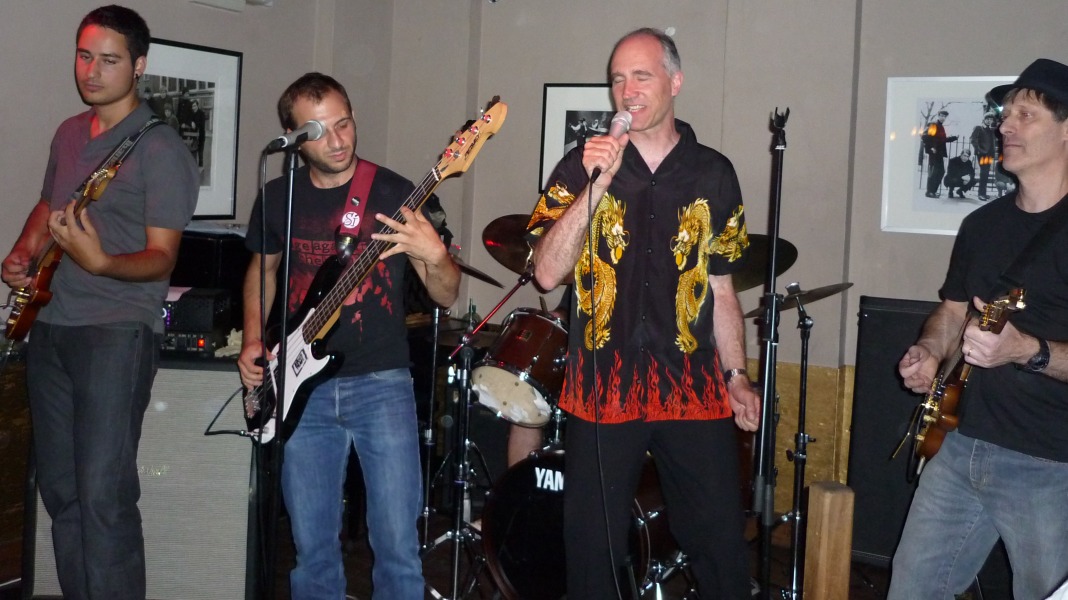
Last night my friends and colleagues from the Zuhlke office and I, collectively known as Karma4Sale, enjoyed playing to a packed house at Peter Parker's Rock'n'Roll Club in Denmark Street, London.

Thanks to everyone who came along to listen and encourage us, to drummer Chris Sluman (sorry Chris, this is the best photo I have and you're completely invisible in it!), to the brilliant support act of young musicians from the Brit school, and not least to the incredible Mr Peter Parker, who made the evening possible in the first place and gave hands-on support throughout. I sincerely recommend his excellent club if you fancy a great night out either as a listener or as a performer.

Wednesday, 19 May 2010

BCS SPA2010 conference

Final day of the conference - it's gone much too quickly as usual. My favourite session to date has been the brief whirlwind tour of agile practices given by Gwyn Morfey and Laurie Young of New Bamboo - "the Sword of Integration". This was a highly interactive session that involved everyone standing up and moving about enthusiastically, which despite the cramped room, meant that we all ended up remembering something instantly useful from the session.

By the way, the sword of integration itself is just one example of an instant solution to a pressing problem. The situation was that multiple developers checking in their changes would cause each other to have merge conflicts. The solution: a paper "sword" quickly assembled, which when held conferred on the holder the right to check in - and hit anyone who checked in when they shouldn't. The principle being illustrated is "just try it" - there is no need to get it absolutely right first time. If it doesn't work, we can change it later.

Sunday, 2 May 2010

Real-time arrival information for London Buses

... should be arriving some time in 2011 - provided, of course, that there are no unforeseen traffic problems :-)

By the way, the link in that post has become obsolete. Try this one instead.

Meanwhile, some enterprising private individual has connected live running information from various feeds with Google's Map API to create Live Bus - but for the stops I am principally interested in, it has no information feeds as yet.

Thursday, 28 January 2010

Ubuntu Desktop 9.10

For a project recently begun, I needed a Linux virtual machine and I downloaded the excellent Chrysaor VMWare appliance pre-built with Ubuntu Desktop 9.10 (karmic koala) and the VMWare Tools (which actually work as specified - you can cut/paste text and even entire files between your host OS and the VM).

NB I was only able to download this using a direct internet connection, because our company firewall blocks BitTorrent. There don't appear to be any FTP or HTTP mirrors of these VMWare images.

There were just a couple of problems with this virtual machine image, for which I have discovered workarounds.
  1. Timezone persistently defaults to EST, no matter what I do in the time/date control panel. It turns out that certain system files need editing by hand (change to reflect your actual location and language):
    • sudo rm /etc/localtime
    • sudo ln -s /usr/share/zoneinfo/Europe/London /etc/localtime
    • sudo vi /etc/timezone -- set it to Europe/London
    • sudo vi /etc/profile -- add the following line at the end:
      export TZ=/etc/localtime
    • sudo vi /etc/default/locale -- set it as follows:
      LANG="en_GB.UTF-8"
  2. Login crash: for a while I thought I had broken the system by installing some upgrade or enabling shared folders. The symptom was that when I logged in, the progress bar would be displayed for a few seconds but instead of displaying the desktop, Ubuntu would restart the windowing system and display the login prompt again. I eventually discovered by trial and error that this was due to starting up in full-screen on my second monitor. Provided I always login while the VM is running in a non-maximised window, it seems very reliable. If you're suffering similar problems, look in your vmware.log file for messages similar to the following:
    VMXVmdbGuestLaunchMenuCB: buf is null.
    VMXVmdbGuestLaunchMenuCB: failed: ret = VMDB failure
    GuestRpc: Channel 3 reinitialized.
I recommend that the first thing you do is create a new user ID for yourself with admin rights, and log in under that user to do everything else.

I upgraded Mercurial to 1.4.1 and TortoiseHg to 0.9.2 by downloading the following Debian packages and installing them manually using dpkg -i:
  1. mercurial_1.4.1-1_i386.deb and mercurial-common_1.4.1-1_all.deb from ftp://mirror.switch.ch/mirror/ubuntu/pool/universe/m/mercurial/
  2. tortoisehg_0.9.2-1_all.deb and tortoisehg-nautilus_0.9.2-1_all.deb from ftp://mirror.switch.ch/mirror/ubuntu/pool/universe/t/tortoisehg/
Note that Tortoise doesn't work unless you install the python-iniparse package. Version 0.3.1-1 works with Tortoise 0.9.2-1.

I was able to get Eclipse (Galileo) as a Ubuntu package and installed the excellent HgEclipse plugin from http://hge.javaforge.com/hgeclipse using the Eclipse "Install New Software" option.